|
|
How to send using Gmail email
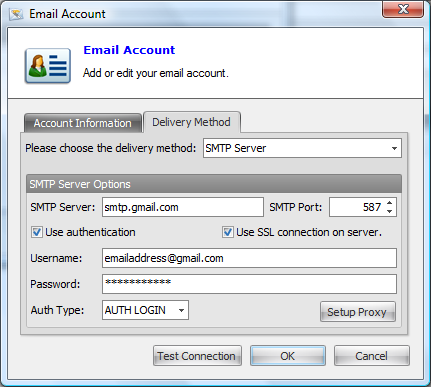
Sending email from your Gmail account is easy with Email Sender Deluxe. Simply create a new email account in Email Sender Deluxe with the following information:

| From Email: |
Your Gmail email address |
| Delivery Method: |
SMTP Server |
| SMTP Server: |
smtp.gmail.com |
| SMTP Port: |
587 |
| Use authentication: |
Yes (checked) |
| Username: |
If your email is george@gmail.com then george@gmail.com is your Username |
| Password: |
Your Password |
| Use SSL connection on server: |
Yes (checked) |
After setting up your account like above, it should work to send email using your Gmail address.
Note: You have to send from your Gmail email address when using the Gmail SMTP server, it will not work to send from a different email address. You should also know that Gmail has a limitation that only allows you to send about 100 emails a day. If you exceed this limit you will start getting errors and you will not be able to send any more emails that day using this SMTP server.
Here's how your Email Account window should look after setting up your Gmail email:
|
|